ExamVeda
Login
Home
71
The key F12 opens a
Discuss
Answer & Solution
Answer: Option A
Solution:
The key F12 opens a Save As dialog box.
72
Ctrl + I is used to
Discuss
Answer & Solution
Answer: Option A
Solution:
Ctrl + I is used to applies italic format to selected text.
73
Ctrl + S is used to
Discuss
Answer & Solution
Answer: Option B
Solution:
Ctrl + S is used to Save Document with same name.
74
If you will be displaying or printing your document on another computer, you'll want to make sure and select the ________ option under the 'Save' tab.
Discuss
Answer & Solution
Answer: Option A
Solution:
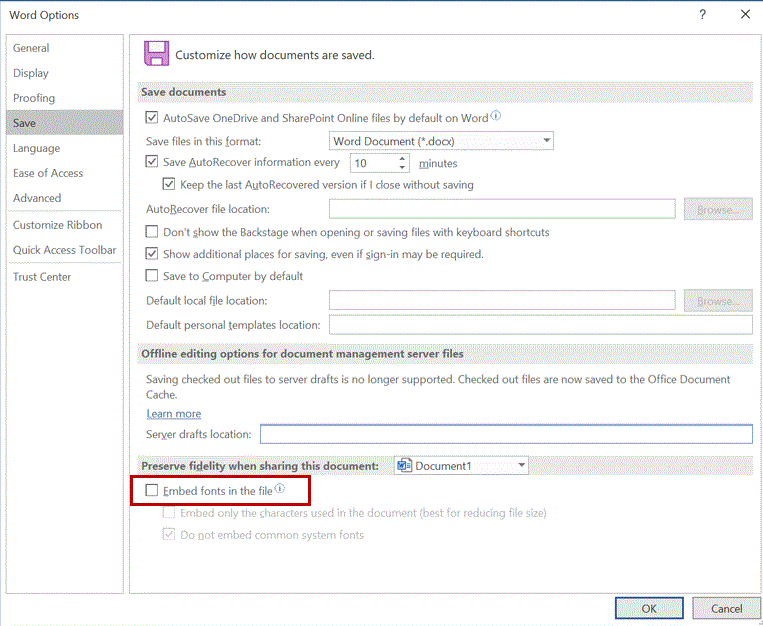
If you will be displaying or printing your document on another computer, you'll want to make sure and select the Embed Fonts option under the 'Save' tab.
In Microsoft Word 2003 and earlier versions - Choose Options from the Tools menu > Word displays the Options dialog box > Click the Save tab and put a check next to Embed True Type Fonts.
In Microsoft Word 2007 and higher versions - Click the Office/File button and then click Options > At the left of the dialog box click Save > Make sure the Embed Fonts In the File check box is selected.

MS Word mcq solution image
75
Ctrl + J is used to
Discuss
Answer & Solution
Answer: Option A
Solution:
Ctrl+J aligns the selected text or line to justify the screen.
76
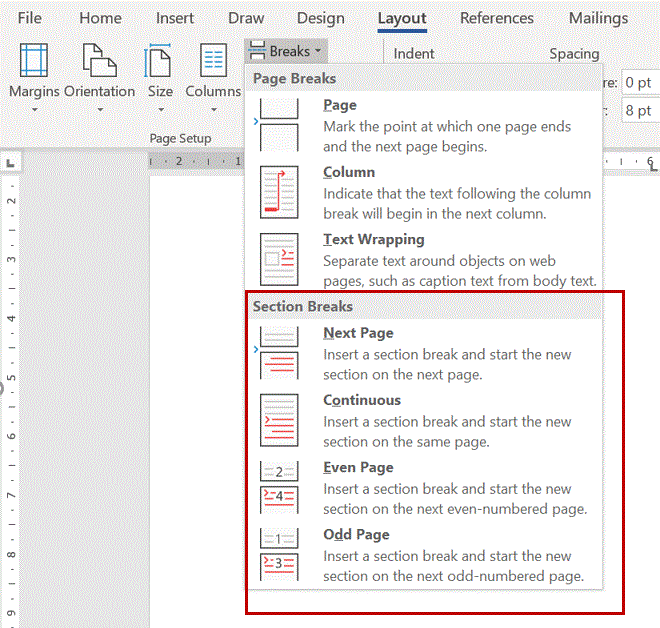
What is a portion of a document in which you set certain page formatting options?
Discuss
Answer & Solution
Answer: Option C
Solution:
MS Word mcq solution image
77
If you need to double underline a word, how will you do that?
Discuss
Answer & Solution
Answer: Option C
Solution:
In Word 2003 and earlier versions - Select the text then choose Format > Font and on Font tab, open Underline Style and choose Double Underline.
In Word 2007 and higher versions - Home > Font > Select double underline in the Underline style drop-down list.
78
How can you apply exactly the same formatting you did to another text?
Discuss
Answer & Solution
Answer: Option C
Solution:
Format Painter is used when you want to copy formatting from one item to another. For example if you have written text in Word, and have it formatted using a specific font type, color, and font size you could copy that formatting to another section of text by using the Format Painter tool.
79
Which of the following is not one of the three 'Mail Merge Helper' steps?
Discuss
Answer & Solution
Answer: Option C
Solution:
There are three Mail Merge Helper steps:
The main document controls the merge. It contains the fixed information that will be in every letter and the merged codes where the variable text will be.
The data source is a document or database that contains the information that will be different for each letter. Remember, the data source is usually the names and addresses. It can be stored in a table in Word, an Excel Spreadsheet or a table in Access.
The merged document is the result of a merge. These are the individual letters that result from the merge. The merge fields are replaced with the actual data from the Data Source file.
80
To select a block of text, click at the beginning of the selection, scroll to the end of the selection, position the mouse pointer at the end of the selection, hold down the ________ key, and then click or drag through the text.
Discuss
Answer & Solution
Answer: Option C
Solution:
To select a block of text, click at the beginning of the selection, scroll to the end of the selection, position the mouse pointer at the end of the selection, hold down the Shift key, and then click or drag through the text.