
ExamVeda
Login
Home
41
Switching between portrait and landscape modes involves the:
Discuss
Answer & Solution
Answer: Option C
Solution:
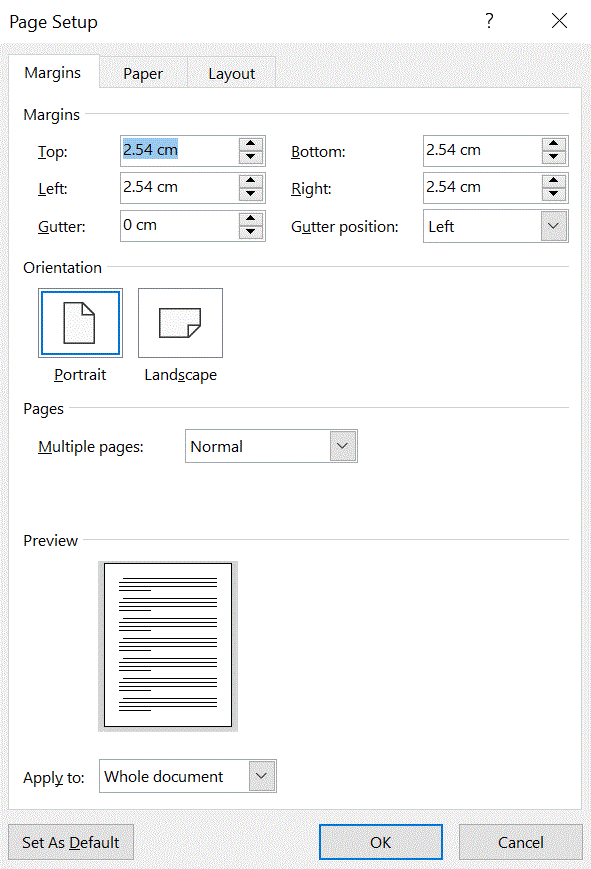
MS Word mcq solution image
42
Where can you change the vertical alignment?
Discuss
Answer & Solution
Answer: Option C
Solution:
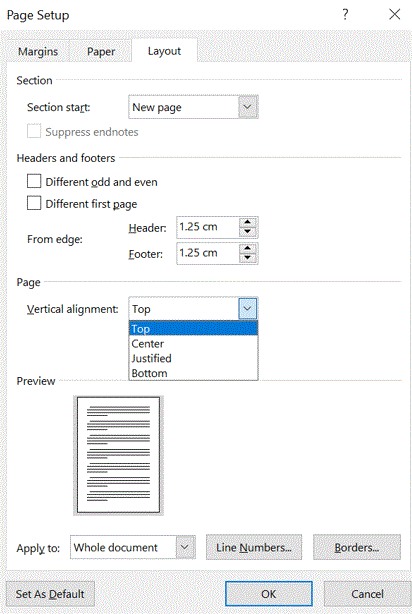
MS Word mcq solution image
43
A ________ is a collection of predefined design elements and color schemes.
Discuss
Answer & Solution
Answer: Option D
Solution:
Themes provide a complete design for our document, including background designs, font styles, colors, and layouts.
44
Change the ________ to create a document in wide format
Discuss
Answer & Solution
Answer: Option A
Solution:
Page orientation is the direction in which a document is displayed or printed. The two basic types of page orientation are portrait (vertical) and landscape (horizontal).
45
________ formatting is the process of changing the way letters, numbers, punctuation marks, and symbols appear on the screen and in print.
Discuss
Answer & Solution
Answer: Option B
Solution:
Character Formatting in word allows us to format text dozens of ways with different text effects, colors, underline styles, and more.
46
The Word Count command on the Tools menu displays the number of words as well as the number of _______ in the current document.
Discuss
Answer & Solution
Answer: Option D
Solution:
Click on Word Count. Select Word Count from the Tools menu dropdown. A box displaying the number of words, characters, lines, pages and paragraphs will appear on the screen. The word count for a selected portion of text will usually be displayed in the bottom bar of your document.
47
Which operation you will perform if you need to move a block of text?
Discuss
Answer & Solution
Answer: Option B
Solution:
1. Select the text that you want to move, and then press CTRL+ X (cut) to move the text.
2. Click where you want to paste the text, and then press CTRL+ V (paste).
48
Ctrl + V is used to
Discuss
Answer & Solution
Answer: Option D
Solution:
In MS Word, Ctrl + V is used to paste the copied content (text, images, tables, etc.) from the clipboard to the current cursor position in the document. However, none of the provided options accurately describe the function of Ctrl + V. It doesn't specifically pertain to pasting at the beginning of the document or in the middle of the document. Therefore, the correct option is D, which indicates that none of the provided options is correct.
49
The ________, or typeface, defines the appearance and shape of letters, numbers, and special characters.
Discuss
Answer & Solution
Answer: Option A
Solution:
The Font, or typeface, defines the appearance and shape of letters, numbers, and special characters.
Fonts and typefaces were two different things — the typeface was the specific design of the letters, while the font referred to the particular size or style of that typeface.
50
Columns dialog box can be opened from
Discuss
Answer & Solution
Answer: Option D
Solution:
Columns dialog box can be opened from any of the above option in Word 2003 and earlier versions.
In Word 2007 and higher versions - Page Layout or Layout tab, click Columns. At the bottom of the list, choose More Columns.