
ExamVeda
Login
Home
1
Which tab is not available on left panel when you open a presentation?
Discuss
Answer & Solution
Answer: Option C
Solution:
The correct answer is C: Notes
Here's why:
When you open a PowerPoint presentation, the left panel is primarily used for navigation and viewing your slides.
Option A: Outline - The Outline tab shows the text content of your slides, allowing you to quickly navigate and edit the text. It's a standard view.
Option B: Slides - The Slides tab displays thumbnails of each slide in your presentation, enabling you to easily jump to a specific slide. This is also a standard view.
Option C: Notes - The Notes section is usually located *below* the slide view, not in the left panel. It's where you can add speaker notes for each slide. Therefore, the Notes tab isn't on the left panel.
Option D: All of above are available - Since Notes is not available on the left panel, this option is incorrect.
2
Which of the following statements is not true?
Discuss
Answer & Solution
Answer: Option D
Solution:
Option A: You can type text directly into a PowerPoint slide but typing in text box is more convenient.
This statement is true. While you can directly type text onto a PowerPoint slide, using text boxes offers more control over formatting and positioning of the text.

Option B: From Insert menu choose Picture and then File to insert your images into slides.
This statement is true. In PowerPoint, you can insert images into slides by selecting "Picture" from the Insert menu and then choosing "File" to select an image from your computer.

Option C: You can view a PowerPoint presentation in Normal, Slide Sorter or Slide Show view.
This statement is true. PowerPoint offers different views like Normal view for editing, Slide Sorter view for arranging slides, and Slide Show view for presenting the slides.

Option D: You can show or hide task pane from View >> Toolbars.
This statement is not true. In Microsoft PowerPoint, you can show or hide the task pane from the View >> Task Pane menu, not from the Toolbars menu.

Therefore, the correct answer is Option D: You can show or hide task pane from View >> Toolbars.
3
To start Microsoft PowerPoint application
Discuss
Answer & Solution
Answer: Option D
Solution:
Option A: Click on Start > Programs > All Programs > Microsoft PowerPoint

This option is a conventional method to start Microsoft PowerPoint from the Start menu in Windows.

It navigates through the Start menu hierarchy to locate and launch the PowerPoint application.

Option B: Hit Ctrl + R then type ppoint.exe and Enter

This option describes a method to start PowerPoint using the "Run" command in Windows.

Pressing Ctrl + R opens the Run dialog, where typing "ppoint.exe" (short for PowerPoint executable) and pressing Enter will launch PowerPoint.

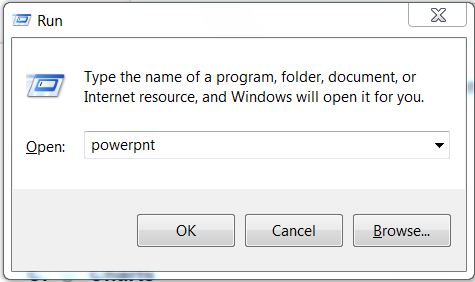
Option C: Click Start > Run then type powerpnt then press Enter

Similar to Option B, this method also utilizes the "Run" command to start PowerPoint by typing "powerpnt" (the executable name for PowerPoint) and pressing Enter.

Option D: All of the above

This option suggests that all the methods mentioned in Options A, B, and C are valid ways to start Microsoft PowerPoint.

Microsoft Office Version Support: These methods are valid for versions of Microsoft Office 2003 and above.

Operating System Support: These methods are primarily supported on Windows operating systems like Windows XP, Windows 7, Windows 8, and Windows 10.

Power Point mcq solution image
4
Which of the following section does not exist in a slide layout?
Discuss
Answer & Solution
Answer: Option D
Solution:
Explanation:
Option A: Titles
Titles are a common section in slide layouts. They typically appear at the top of a slide layout and are used for main headings or topic descriptions.
Option B: Lists
Lists are also a common section in slide layouts. They are used to organize content into bullet points or numbered lists.
Option C: Charts
Charts are a section that can exist in a slide layout, especially in layouts designed for data presentation where a chart placeholder is provided for inserting charts.
Option D: Animations
Animations are not a section that exists in a slide layout. Animations are applied to individual elements within a slide to add movement or effects during slide transitions or presentations.
Therefore, the correct answer is Option D: Animations.
5
PowerPoint presentations are widely used as
Discuss
Answer & Solution
Answer: Option D
Solution:
Option A: Note outlines for teachers
PowerPoint presentations can be used by teachers to outline notes for their lectures or presentations.
Option B: Project presentations by students
Students often use PowerPoint for presenting their projects or assignments in a structured and visually appealing format.
Option C: Communication of planning
PowerPoint is frequently used in businesses and organizations to communicate plans, strategies, and ideas effectively.
Therefore, the correct answer is Option D: All of above.
6
________ controls all the main slide control tasks for your presentation.
Discuss
Answer & Solution
Answer: Option D
Solution:
Option A: Task Pane
This is incorrect. The Task Pane in PowerPoint provides additional options and tools related to the current task or selection, but it does not control main slide control tasks.
Option B: Task Bar
This is also incorrect. The Task Bar in Windows controls the open programs and some system functions, but it is not specific to controlling main slide tasks in PowerPoint.
Option C: Control Panel
This is incorrect. The Control Panel in Windows is used for system settings and configurations, not for controlling slide tasks in PowerPoint.
Option D: None of above
This is the correct answer. None of the options provided (Task Pane, Task Bar, or Control Panel) control main slide control tasks directly in PowerPoint.
Therefore, the correct answer is Option D: None of above.
7
Which of the following cannot be toggled from View > Toolbars?
Discuss
Answer & Solution
Answer: Option C
Solution:
Option A: Control Toolbox
This option can be toggled from the View menu in PowerPoint. The Control Toolbox typically contains controls like buttons, checkboxes, and other ActiveX controls used for forms and applications.
Option B: Slides
This option can be toggled from the View menu. It allows you to switch between different views of your slides, such as Normal view, Slide Sorter view, and Slide Show view.
Option C: Revisions
This option cannot be toggled from View > Toolbars. Revisions and tracking changes are managed under the Review tab, not directly from the Toolbars menu in PowerPoint.
Option D: Reviewing
This option cannot be toggled from View > Toolbars. Reviewing options, such as comments, tracking changes, and comparing presentations, are managed under the Review tab in PowerPoint.
Therefore, the correct answer is Option C: Revisions.
8
Which of the following pane is not available in Task Pane?
Discuss
Answer & Solution
Answer: Option C
Solution:
Word Art in PowerPoint is not available directly in the Task Pane. Instead, it is accessed through the Insert menu or as a dropdown option under the View menu for applying decorative text effects. The Task Pane typically includes options like Getting Started and Clip Art, which provide templates and images respectively. Therefore, Option C is the correct answer as Word Art is not available in the Task Pane of PowerPoint but rather accessed through other menus.
9
Which of the following pane is NOT available in Task Pane?
Discuss
Answer & Solution
Answer: Option B
Solution:
Master Slide is not available in Task Pane. in Power point 2003 and earlier versions.
10
A new presentation can be created from
Discuss
Answer & Solution
Answer: Option D
Solution:
In PowerPoint, a new presentation can be created using various methods. You can start with a Blank Presentation (Option A), which allows you to create a new presentation from scratch without any predefined content. Alternatively, you can create a new presentation based on an Existing Presentation (Option B), which allows you to use an already created presentation as a starting point and make modifications to it. Another method is to use a Design Template (Option C), which provides pre-designed layouts and formatting options for your presentation.

Therefore, Option D: All of above is the correct answer as all the listed options can be used to create a new presentation in PowerPoint.