ExamVeda
Login
Home
71
Suppose you wanted to create an AutoCorrect entry that would type the words 'We regret to inform you that your submission has been declined' Of the following choices, which would be the best name you could assign to this entry?
Discuss
Answer & Solution
Answer: Option B
Solution:
Subdual is not commonly word whereas other options are used frequently used word.
So in given option less common word is subdual and when we assign it to auto correct option when ever we type subdual word will auto bring entire sentence 'We regret to inform you that your submission has been declined'.
72
If you want to convert a symbol or several lines of text into an AutoCorrect entry, you should:
Discuss
Answer & Solution
Answer: Option A
Solution:
Insert the symbol or type the text in a Word document first. Then, select the text or symbol and go to the AutoCorrect dialog box.
73
How can you access the font size tool on formatting toolbar?
Discuss
Answer & Solution
Answer: Option D
Solution:
Ctrl + Shift + P is used to change the font size.
74
How can you make the selected character superscripted?
Discuss
Answer & Solution
Answer: Option B
Solution:
For superscript, press Ctrl, Shift, and the Plus sign (+) at the same time.
75
What does Ctrl + = key effect?
Discuss
Answer & Solution
Answer: Option B
Solution:
For subscript, press Ctrl and the Equal sign (=) at the same time.
76
How can you increase the font size of selected text by one point every time?
Discuss
Answer & Solution
Answer: Option A
Solution:
To increase the font size, press Ctrl+].
To decrease the font size, press Ctrl+[.
77
What is the smallest width of a column?
Discuss
Answer & Solution
Answer: Option B
Solution:
0.5"
78
How much space in minimum must be provided between columns?
Discuss
Answer & Solution
Answer: Option A
Solution:
0"
79
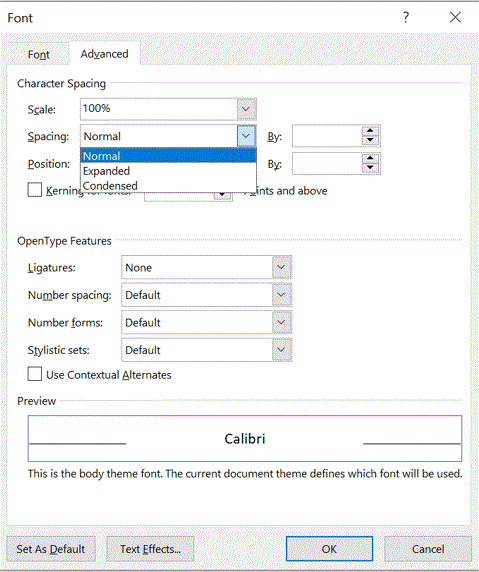
Which of the following is not available in Font Spacing?
Discuss
Answer & Solution
Answer: Option B
Solution:
Click the Home tab > Click the Font Dialog Box Launcher > Click the Advanced tab > Click the Spacing list arrow, click an option, and then specify a point size to expand or condense spacing by the amount specified.

MS Word mcq solution image
80
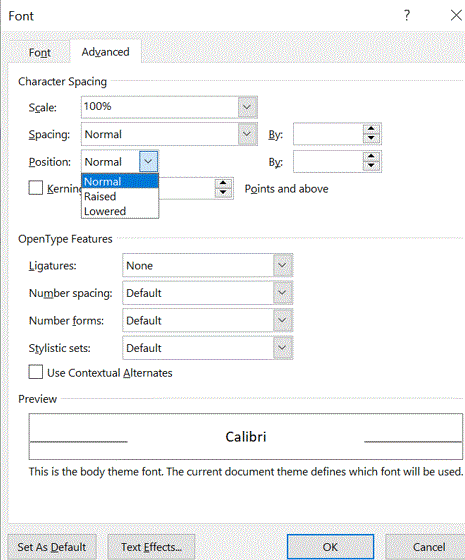
Which of the following position is not available for fonts on MS Word?
Discuss
Answer & Solution
Answer: Option D
Solution:
MS Word mcq solution image