
ExamVeda
Login
Home
31
Short cut Ctrl + F is used to
Discuss
Answer & Solution
Answer: Option A
Solution:
Short cut Ctrl + F is used to open Find and Replace Dialog box with activating Find Tab.
32
Short cut Ctrl + H is used to
Discuss
Answer & Solution
Answer: Option A
Solution:
Ctrl + H is a shortcut in Microsoft Word.
It's used to quickly access the "Find and Replace" feature.
When you press Ctrl + H, a dialog box pops up.
This dialog box has two main tabs: "Find" and "Replace".
The Ctrl + H shortcut directly opens this dialog box with the "Replace" tab already selected and active.
So, you can immediately start replacing text in your document without having to click on the "Replace" tab first.
The other options are incorrect because:
Option B, C & D: are related to "Insert Hyperlink", which has a different shortcut key.
33
Short cut Ctrl + P used to
Discuss
Answer & Solution
Answer: Option D
Solution:
Short cut Ctrl + P used to open Print Dialog box
34
Short cut Ctrl + T is used to
Discuss
Answer & Solution
Answer: Option A
Solution:
If you like to use the keyboard to do your formatting, you may be interested in knowing how to format a paragraph to use a hanging indent just by using a keyboard shortcut. You do this in Word by pressing Ctrl+T.
35
When sharing data in Office, the ________ document is the document in which the data was first entered.
Discuss
Answer & Solution
Answer: Option A
Solution:
A source document is a document in which data collected for a clinical trial is first recorded.
36
With which view can you see how text and graphics will appear on the printed page?
Discuss
Answer & Solution
Answer: Option B
Solution:
In Print Layout view we can see how text and graphics will appear on the printed page.
37
Portrait and Landscape are
Discuss
Answer & Solution
Answer: Option A
Solution:
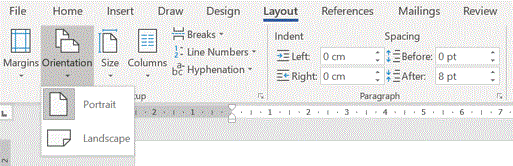
MS Word mcq solution image
38
To verify that the note text is positioned correctly on the page, switch to _____ view or display the document in print preview.
Discuss
Answer & Solution
Answer: Option B
Solution:
Print layout provides us with a view of the document where we can see page breaks and other features, as well as the basic character and paragraph formatting. This is helpful when we want to see where text ends on a page or where paragraphs break over two pages.
39
Which of the following is true regarding page Orientation of a Document?
Discuss
Answer & Solution
Answer: Option A
Solution:
Word allows us to create documents with pages that are in landscape or portrait view. We can change the orientation any time you want but it applies to every single page in a document. There is no option to change the page orientation for a single page in MS Word.
40
Which feature helps you to inserts the contents of the Clipboard as text without any formatting
Discuss
Answer & Solution
Answer: Option A
Solution:
Paste Special feature helps US to inserts the contents of the Clipboard as text without any formatting.
To invoke Paste Special - Home > Paste > Paste Special or CTRL+ALT+V.