
ExamVeda
Login
Home
91
Presentation designs regulate the formatting and layout for the slide and are commonly called
Discuss
Answer & Solution
Answer: Option B
Solution:
Presentation designs that regulate the formatting and layout for slides are commonly referred to as Option B: Templates. Templates in PowerPoint provide pre-designed layouts, color schemes, fonts, and styles that help users create consistent and professional-looking presentations quickly.
Option A: Design plates is not a standard term used in PowerPoint for presentation designs.
Option C: Placeholders are containers on a slide for content such as text, images, and media.
Option D: Blueprints typically refer to detailed plans or designs but are not specifically used in the context of PowerPoint templates.
Therefore, the correct answer in this context is Option B: Templates.
92
Which of the following bypasses the print dialog box when printing individual slides or an entire presentation?
Discuss
Answer & Solution
Answer: Option B
Solution:
To bypass the print dialog box when printing individual slides or an entire presentation in PowerPoint, you would use Option B: The print button. This option directly sends the print job to the default printer without opening the print dialog box for additional settings.
Option A: File, print, preview opens the print preview dialog where you can see how your slides will appear when printed but does not bypass the print dialog box.
Option C: File, print opens the print dialog box where you can specify printing options before sending the job to the printer.
Option D: Ctrl + p is a keyboard shortcut to open the print dialog box, not bypass it.
Therefore, the correct answer in this context is Option B: The print button.
93
To add a header or footer to your handout, you can use
Discuss
Answer & Solution
Answer: Option C
Solution:
To add a header or footer to your handout in PowerPoint, you can use Option C: The handout master. The handout master allows you to customize how your slides will appear when printed as handouts, including options to add headers, footers, date, page numbers, and other elements that appear on each handout page.
Option A: The title master is used to customize the appearance of slide titles in the slide master view, not for handouts.
Option B: The slide master is used to customize the overall layout and design of slides in the presentation.
Option D: All of above is incorrect because Options A (title master) and B (slide master) do not specifically apply to adding headers or footers to handouts.
Therefore, the correct answer in this context is Option C: The handout master.
94
Which of the following will not advance the slides in a slide show view?
Discuss
Answer & Solution
Answer: Option A
Solution:
In PowerPoint slide show view, the action that will not advance the slides is Option A: Esc key. Pressing the Esc key exits the slide show view rather than advancing to the next slide.
Option B: The spacebar advances to the next slide when pressed.
Option C: The Enter key also advances to the next slide in slide show view.
Option D: The mouse button (typically left-click) can be configured to advance slides by default.
Therefore, the correct answer in this context is Option A: Esc key.
95
What are lines, curve, freeform, and scribble?
Discuss
Answer & Solution
Answer: Option B
Solution:
Lines, curve, freeform, and scribble are types of drawing tools available in PowerPoint. They allow users to create custom shapes and paths directly on slides. These tools are collectively known as Option B: Types of custom motion paths. Motion paths define the movement of an object on a slide during a presentation.
Option A: Emphasis effects that can be applied to animations refers to different ways to highlight or draw attention to objects during animations, not related to drawing tools.
Option C: Predefined entrance and exit effects are animation effects applied to objects when they enter or exit a slide during a presentation.
Option D: All of the above is incorrect because Options A and C do not accurately describe lines, curve, freeform, and scribble as drawing tools.
Therefore, the correct answer in this context is Option B: Types of custom motion paths.
96
Comments on a presentation can record who wrote them and when they were added. What's the automatic way in PowerPoint 2002?
Discuss
Answer & Solution
Answer: Option B
Solution:
In PowerPoint 2002 (and later versions), comments on a presentation can automatically record who wrote them and when they were added using Option B: Use comments. Comments in PowerPoint allow collaborators to add feedback, suggestions, or notes directly onto specific slides or elements within the presentation.
Option A: Use online collaboration typically refers to real-time collaboration features where multiple users can work on a presentation simultaneously.
Option C: Use the notes page is used for adding speaker notes or additional information related to the slides but does not automatically record comments with user details.
Option D: All of the above is incorrect because while Options A and C are related to collaboration and notes, they do not specifically address the automatic recording of comments with user details.
Therefore, the correct answer in this context is Option B: Use comments.
97
When using PowerPoint, to play a PowerPoint show for previewing the show, select
Discuss
Answer & Solution
Answer: Option C
Solution:
To play a PowerPoint show for previewing, you would select Option C: View, slide show. This option allows you to view the presentation in full screen mode, exactly as it will appear when presented to an audience.
Option A: View, slide sorter displays all slides in miniature form, allowing you to rearrange their order, but does not play the show.
Option B: View, slide shows individual slides in editing mode, not in full-screen presentation mode.
Option D: View outline displays the presentation in outline form, showing slide titles and main points.
Therefore, the correct answer in this context is Option C: View, slide show.
98
In Microsoft PowerPoint in order to see all the slides on one screen use
Discuss
Answer & Solution
Answer: Option A
Solution:
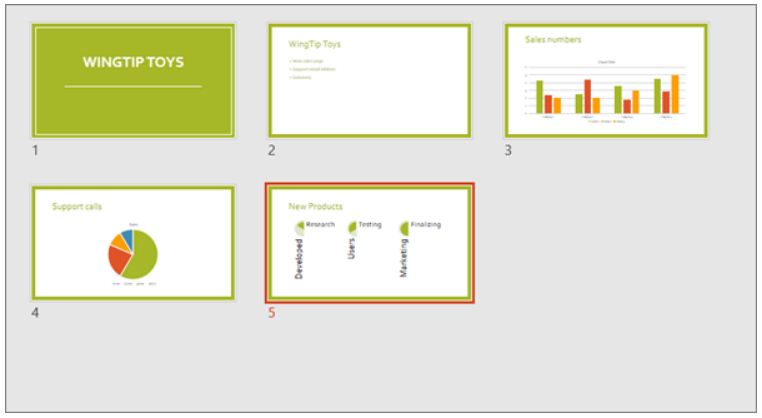
Slide Sorter view (below) displays all the slides in your presentation in horizontally sequenced, thumbnails. Slide show view is helpful if you need to reorganize your slides—you can just click and drag your slides to a new location, or add sections to organize your slides into meaningful groups. Power Point mcq solution image
99
What's the best place to find animated images for your PowerPoint 2002 presentation?
Discuss
Answer & Solution
Answer: Option A
Solution:
The best place to find animated images for a PowerPoint 2002 presentation is Option A: Microsoft online. Microsoft provides a wide range of animated clipart and images that can be directly accessed and inserted into PowerPoint presentations via their online platform.
Option B: Word clipart primarily refers to static images and clipart available within Microsoft Word, which may not include animated options.
Option C: PowerPoint tools and ins (assuming it refers to PowerPoint tools and add-ins) generally enhance functionality or provide additional features rather than specifically offering animated images.
Option D: All of the above is incorrect because while Microsoft online could provide animated images, Options B and C do not typically provide animated images directly.
Therefore, the correct answer in this context is Option A: Microsoft online.
100
What's the easy way to apply varied animations to test on slides
Discuss
Answer & Solution
Answer: Option B
Solution:
To apply varied animations to text on slides in PowerPoint, the easy way is to use Option B: apply an animation scheme. Animation schemes in PowerPoint allow you to apply predefined animations to all or selected elements on your slides, providing a quick and consistent way to add animations.
Option A: apply effects in the custom animation text pane refers to manually applying animations and effects to individual elements using the custom animation pane, which is more detailed and specific than applying animation schemes.
Option C: customize bullets with animated clipart is not directly related to applying varied animations to text on slides; it focuses on customizing bullet points with animated clipart, which is a different feature.
Option D: all of above is incorrect because Options A and C do not accurately describe applying varied animations to text using animation schemes.
Therefore, the correct answer in this context is Option B: apply an animation scheme.