
ExamVeda
Login
Home
11
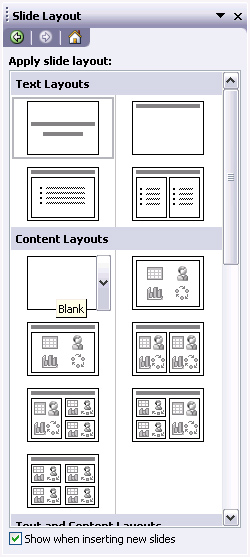
In slide layout panel how many layouts are available for text layout by default?
Discuss
Answer & Solution
Answer: Option A
Solution:
In MS Powerpoint 2003 and earlier versions, there are 4 Layouts are available by default for text layout.
Power Point mcq solution image

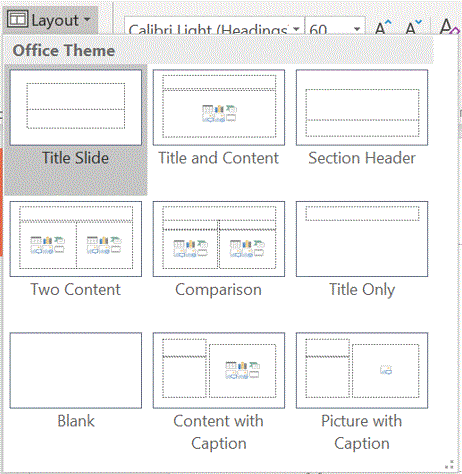
In MS Powerpoint 2007 and higher versions, there are 9 Layouts are available as office theme in slide layout panel.
Power Point mcq solution image
12
Which of the following statement is false?
Discuss
Answer & Solution
Answer: Option B
Solution:
If we choose to select from the pre-made slide layouts, we cannot delete the objects in the layout is wrong sentence. We can delete the objects and make changes accordingly.
13
What lets you to create new presentation by selecting ready-made font color and graphics effects?
Discuss
Answer & Solution
Answer: Option C
Solution:
A PowerPoint template is a pattern or blueprint of a slide or group of slides that you save as a .potx file. Templates can contain layouts, theme colors, theme fonts, theme effects, background styles, and even content.

You can create your own custom templates and store them, reuse them, and share them with others. Additionally, you can find many different types of free templates built-in to PowerPoint. You can search for templates that are right for your presentation when you go to File > New in PowerPoint.

Source : office.com

14
Which command will you use in PowerPoint if you need to change the color of different objects without changing content?
Discuss
Answer & Solution
Answer: Option B
Solution:
Each Microsoft PowerPoint theme includes a built-in color scheme to apply to your slides. If you don’t like the available choices, you can create custom color schemes in PowerPoint to use in your presentation.
15
What PowerPoint feature will you use to apply motion effects to different objects of a slide?
Discuss
Answer & Solution
Answer: Option D
Solution:
An animation scheme is just a predefined slide transition and a collection of animation effects applied to slide objects.
16
What feature will you use to apply motion effects in between a slide exits and another enters?
Discuss
Answer & Solution
Answer: Option A
Solution:
Slide transitions are the effects that occur when you move from one slide to the next during a presentation. You can control the speed, add sound, and customize the properties of transition effects.
17
The difference between Slide Design and Auto Content Wizard is
Discuss
Answer & Solution
Answer: Option C
Solution:
The AutoContent Wizard creates a new presentation using built-in templates, offering sample content ideas to help we organize the information we include on each slide. This feature is not available in Microsoft Office PowerPoint 2007 and higher versions. Instead, we can create our presentation quickly and easily by using templates.
Slide Design provided different theme, variants, size which we need to apply as per our requirement. It does not provide sample content.
18
In which menu can you find features like Slide Design, Slide Layout etc.?
Discuss
Answer & Solution
Answer: Option B
Solution:
In Format Menu we can find features like Slide Design, Slide Layout etc. in Powerpoint 2003 and earlier versions.
19
Which menu provides you options like Animation Scheme, custom Animation, Slide Transition?
Discuss
Answer & Solution
Answer: Option D
Solution:
Slide Show Menu provides us options like Animation Scheme, custom Animation, Slide Transition in Powerpoint 2003 and earlier versions.
20
How many steps are there between Start and Finish in AutoContent Wizard?
Discuss
Answer & Solution
Answer: Option A
Solution:
The AutoContent Wizard creates a new presentation using built-in templates, offering sample content ideas to help we organize the information we include on each slide. It has three steps between Start and Finish, Presentation Type, Presentation Style and Presentation options. This feature is not available in Microsoft Office PowerPoint 2007 and higher versions. Instead, we can create our presentation quickly and easily by using templates.